2. The ext2 File System
This is based on the English translation of Section 29.2 of 宋劲杉’s book. You may copy, redistribute and modify it subject to the terms of GFDL v1.3.
This section introduce the ext2 file system, which is one of the historical file systems used in Linux. The reason of choosing it to study here is that it is relatively simple and easy to understand, while still providing all fundamental concepts of file systems. The ext2 file system is also the basis of the ext3 and ext4 file systems, and it is more or less forward compatible with ext4, in the sense that an ext4 partition with certain features disabled can be mounted (read-only) as ext2.
Essentially, ext3 can be regarded as ext2 with journaling, and ext4 can be regarded as ext3 with extents.
2.1 Overall Storage Layout
A disk may be divided into multiple partitions. Before a partition can store files, it must be formatted into a particular file-system format using a formatting utility such as mkfs. Formatting writes management information describing the storage layout to the disk.
The following figure illustrates the layout of a disk partition after it has been formatted as an ext2 file system.
Figure 29.2. Overall storage layout of an ext2 file system
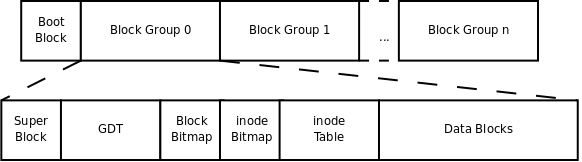
The smallest unit of storage in a file system is a block. The block size is determined when the file system is formatted. For example, the -b option of mke2fs can set the block size to 1024, 2048, or 4096 bytes.
The boot block shown in the diagram has a default size of 1 KB. It is reserved for boot-related information and cannot be used by the file system. The ext2 file system begins after the boot block.
The ext2 file system divides the whole partition into multiple equally sized block groups. Each block group contains the following parts:
- Superblock
- Group Descriptor Table (GDT)
- Block Bitmap
- Inode Bitmap
- Inode Table
- Data Blocks
The following describes the purpose of each part.
The superblock describes file-system-wide information, such as:
- block size;
- file-system version;
- time of the last mount;
- total number of blocks and inodes;
- counts of free blocks and inodes; and
- other file-system parameters.
A copy of the superblock is placed at the beginning of each block group.
The Group Descriptor Table consists of group descriptors. There is one group descriptor for each block group in the file system.
Each group descriptor contains information about one block group, such as:
- where its inode table begins;
- where its data blocks begin;
- how many free inodes remain; and
- how many free data blocks remain.
Like the superblock, copies of the group descriptor table are stored at the beginning of block groups because this information is important. If a superblock is damaged, the entire partition may become inaccessible; if a group descriptor is damaged, the corresponding block group may become inaccessible.
Normally, the kernel uses the primary copy in block group 0. When
e2fsckchecks file-system consistency, it can use backup copies to repair or restore the primary metadata.Block Bitmap
Blocks in a block group are used as follows:
- Data blocks store file contents.
- Metadata blocks store the superblock, group descriptor table, block bitmap, inode bitmap, and inode table.
For example, if a partition has a block size of 1024 bytes and a file is 2049 bytes long, the file requires three data blocks. Even though the third block stores only one byte of file content, the entire block is allocated.
How can the file system determine which blocks are already in use and which are free? This is the job of the block bitmap.
A block bitmap occupies one block. Each bit represents one block in the block group:
1means the corresponding block is in use.0means the corresponding block is free.
Why is
dfusually fast when calculating total disk usage? In principle, file-system-wide free-space information can be obtained from block-group accounting information (in the superblock) rather than by scanning every file in the partition. In contrast,duon a large directory is slower because it must traverse the files and subdirectories beneath that directory.This raises another question: how many block groups should a partition have when it is formatted?
One important constraint is that a block bitmap must occupy only one block. Suppose the block size is $b$ bytes. One bitmap block contains $8b$ bits, so it can represent at most $8b$ blocks. Therefore, one block group can contain at most $8b$ blocks.
If the partition contains $s$ blocks, then it should at least have around
$s / (8b)$
block groups.The
-goption ofmke2fscan specify the number of blocks per group, but it is normally unnecessary becausemke2fscalculates an appropriate value.The inode bitmap is similar to the block bitmap. It also occupies one block, and each bit indicates whether an inode (coined from the phrase “index node”) is allocated or free.
Inode Table:
A file must store not only its contents but also descriptive information, including:- file type: regular file, directory, symbolic link, and so on;
- permissions;
- file size;
- creation, modification, and access timestamps.
This is the information displayed by
ls -l. It is stored in the file’s inode, rather than in the file’s data blocks.Each file has one inode. The inodes belonging to a block group form that group’s inode table.
The number of blocks used by the inode table is decided at format time and recorded in the group descriptor.
The default policy used by
mke2fsin the example is to allocate one inode for every 8 KB of file-system space. Since data blocks make up most of a block group, this can approximately be understood as allocating one inode per 8 KB of data-block capacity.This policy is efficient if the average file size is slightly less than 8 KB:
- If the partition mainly stores large files, such as movies, data blocks may run out while many inodes remain unused.
- If it mainly stores small files, such as source-code files, inodes may run out before data blocks do, wasting data-block capacity.
If the user can predict the typical size of future files, the
-ioption ofmke2fscan specify how many bytes of storage should correspond to one inode.Data blocks have different purposes depending on the file type.
- Regular files: File contents are stored in data blocks.
- Directories: The names of files and subdirectories are stored in the directory’s data blocks. The filename is stored in the directory entry, while most other information displayed by
ls -lis stored in the target file’s inode. A directory is therefore a special kind of file. - Symbolic links: If the target pathname is short, it may be stored directly in the inode for faster access. If the pathname is long, a data block is allocated to store it.
- Device files, FIFOs, and sockets: These special files do not normally have data blocks. For device files, the major and minor device numbers are stored in the inode.
Now consider several small experiments.
Listing the home directory:
1 | $ ls -l |
Why are directory sizes all multiples of 4096? Because this partition’s block size is 4096 bytes, and a directory’s size is an integer multiple of its allocated data blocks.
Why are some directories larger than others? A directory’s data blocks contain the names of its entries. If a directory contains many files and subdirectories, one block may not be enough to store all names, so more data blocks must be allocated.
Another example:
1 | $ ls -l /dev |
The file type of xconsole is p, meaning that it is a named pipe (FIFO). A FIFO is associated with kernel-managed buffering rather than ordinary on-disk file contents, so it has no data blocks and has a size of zero.
The file type of zero is c, meaning that it is a character device. It represents a device driver in the kernel and also has no ordinary data blocks. Instead of an ordinary file size, the listing shows 1, 5, its major and minor device numbers. When this file is accessed, the kernel uses those numbers to locate the relevant driver.
Now create a regular empty file and a symbolic link:
1 | $ touch hello |
The newly created file hello has a size of zero. The symbolic link halo, which points to hello, has size 7. This is because the symbolic link stores the seven-character pathname:
1 | ./hello |
Now try a hard link:
1 | $ ln ./hello hello2 |
Except for their names, hello and hello2 have identical attributes. The second field changed from 1 to 2.
Fundamentally, hello and hello2 are two names for the same file in the file system. The second field printed by ls -l is the hard-link count: the number of directory entries that refer to that inode. These names may be stored in different directory data blocks and may occur under different pathnames.
Because both names refer to one inode, their attributes are identical: the attributes are read from that shared inode.
Now examine directory hard-link counts:
1 | $ mkdir a |
First, directory a is created; then subdirectory a/b is created.
Directory a has a hard-link count of 3. The three references are:
ain its parent directory;.inside directorya; and..inside subdirectorya/b.
Directory b has a hard-link count of 2. The two references are:
bin directorya; and.inside directoryb.
Directory hard links are created through these special directory entries. Ordinary users cannot use ln to create arbitrary hard links to directories, although ln -s can create symbolic links to directories.
2.2 Case Study
Creation of a File System
To format a partition for studying file-system format, an unused disk partition would normally be required. For convenience, however, we can format an ordinary file and treat it as a partition. We can then inspect the file’s contents to verify the concepts discussed above.
First, create and zero-fill a 1 MB file:
1 | $ dd if=/dev/zero of=fs count=256 bs=4K |
The cp command copies one whole file into another, while dd copies data in configurable units.
This command copies the first 1 MB (256 × 4 KB) from /dev/zero into a file named fs.
Earlier we saw that /dev/zero is a special device file with device number 1, 5. Reading it yields an unlimited stream of zero bytes (0x00). Therefore, this command writes 1 MB of zero bytes into fs.
The parameters mean:
if: input file;of: output file;count: number of units to copy;bs: size of each unit.
Next, format fs. That is, treat its data as a 1 MB disk partition and create block groups and ext2 metadata inside it:
1 | $ mke2fs fs |
When formatting a real partition, a block-device pathname such as /dev/sda1 would normally be specified. Here, fs is an ordinary file rather than a block device, so mke2fs warns that the operation might be accidental and asks for confirmation.
After formatting, fs is still 1 MB, but it is no longer all zeroes. It now contains a block group and file-system metadata.
Mounting and Unmounting the File System
An ordinary file containing a file system can be mounted like a disk partition:
1 | $ sudo mount -o loop fs /mnt |
The -o loop option tells mount that fs is an ordinary file, not a block-device file. mount uses a loop device to interpret the file’s contents as a file system.
After formatting, the root directory contains the directory entries:
...lost+found
In other directories, . refers to the current directory and .. refers to the parent directory. In the root directory, both . and .. refer to the root itself.
The lost+found directory is used by e2fsck. If file-system checking finds orphaned blocks or inodes whose original parent cannot be determined, it can place recovered objects there—hence the name “lost and found.”
Files may now be created or deleted under /mnt; those changes are stored in fs. Then unmount the file system so that all modifications are safely written:
1 | $ sudo umount /mnt |
The remaining experiments assume the freshly created file system has not been modified. If files were added or removed, the exact results may differ, but the general concepts remain the same.
Inspecting the Superblock and Group Descriptor Table
The dumpe2fs utility can display information from the superblock and group descriptor table:
1 | $ dumpe2fs fs |
Using the knowledge above, we can verify this information.
The block size is 1024 bytes. A 1 MB partition has 1024 blocks. Block 0 is the boot block; ext2 begins after it. Therefore, group 0 occupies blocks 1 through 1023, a total of 1023 blocks.
The block bitmap occupies one block and has:
1 | 1024 × 8 = 8192 bits |
That is enough to describe all 1023 blocks in this small file system, so a single block group is sufficient.
The default policy allocates one inode per 8 KB. Therefore, a 1 MB partition contains:
1 | 1 MB / 8 KB = 128 inodes |
This matches dumpe2fs.
Use a binary dump utility to inspect every byte in the file system and compare it with the output of dumpe2fs:
1 | $ od -tx1 -Ax fs |
Lines beginning with * indicate that an entire range contains zeroes and has been omitted.
The first 1 KB, from offset 000000, is the boot block. Because this is not a real disk partition, it contains only zeroes.
The 1 KB range from 000400 to 0007ff is the superblock.
Figure 29.3. Superblock
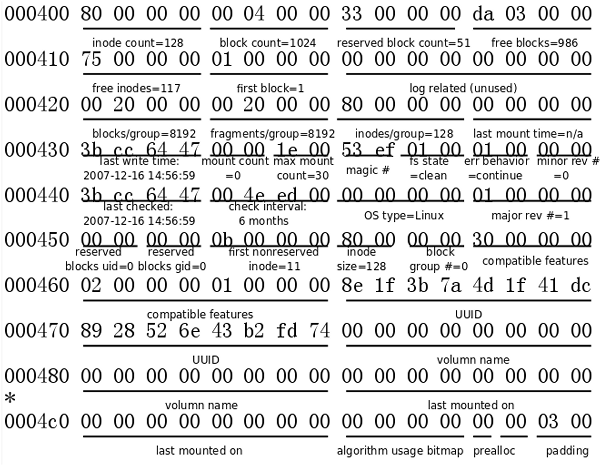
The last 204 bytes of the superblock, from offset 0004d0 to the end, are padding bytes reserved for future use and are not shown in the original diagram.
Fields in ext2 are stored in little-endian order. If byte positions in the file are treated as addresses, lower addresses contain lower-order bytes.
The fields’ positions, lengths, and meanings are described in Understanding the Linux Kernel.
Starting at 000800 is the group descriptor table. This small file system has only one group descriptor.
1 | Group 0: (Blocks 1-1023) |
Figure 29.4. Block Group Descriptor

The entire file system is 1 MB, and each block is 1 KB, so there are 1024 blocks. Excluding the boot block, blocks 1–1023 belong to group 0.
- Block 1 is the superblock.
- The group descriptor says that the block bitmap is block 6.
- Therefore blocks 2–5 contain the group descriptor table and reserved GDT space.
- The inode bitmap is block 7.
- The inode table starts at block 8.
Where does the inode table end?
The superblock says there are 128 inodes per block group. Each inode is 128 bytes, so the inode table occupies:
1 | 128 × 128 bytes = 16 KB = 16 blocks |
Therefore, the inode table covers blocks 8–23.
Data blocks begin at block 24.
The group descriptor says there are 986 free blocks. In a newly created file system, the free blocks are contiguous: blocks 38–1023. Thus blocks 1–37 are in use.
Inspecting the Block and Inode Bitmaps
The block bitmap shows the first 37 bits set to 1:
1 | 001800 ff ff ff ff 1f 00 00 00 00 00 00 00 00 00 00 00 |
The first 37 bits—the first four bytes plus the low five bits of the fifth byte—are all 1, indicating that blocks 1–37 are allocated.
Blocks 38–1023 correspond to zero bits, through the low seven bits of the final byte on line 001870. Bits after that correspond to space outside this file system and are meaningless.
The bits within each byte are interpreted from least significant bit to most significant bit. As files are created and deleted, the set bits in the block bitmap become noncontiguous.
The group descriptor says that 117 inodes are free. Because this is a new file system, free inode numbers are also contiguous: inodes 12–128.
The inode bitmap shows the first 11 bits set:
1 | 001c00 ff 07 00 00 00 00 00 00 00 00 00 00 00 00 00 00 |
The first eleven bits are 1, indicating that inodes 1–11 are allocated. The 128 bits on line 001c00 represent all valid inodes, so bits in subsequent lines have no meaning for this group.
Of the eleven allocated inodes:
- the first ten inodes are reserved by ext2;
- inode 2 is the root directory;
- inode 11 is the
lost+founddirectory.
The group descriptor also reports that this group contains two directories: the root directory and lost+found.
Inspecting the Root Directory’s Inode using debugfs
Another useful tool for exploring file systems is debugfs. It provides an interactive command-line interface for examining information, recovering data, and repairing file-system errors.
Open fs with debugfs and enter help to see available commands:
1 | $ debugfs fs |
At the debugfs prompt, enter stat / to display the inode information for the root directory:
1 | Inode: 2 Type: directory Mode: 0755 Flags: 0x0 Generation: 0 |
Press q to leave that display, and use quit to exit debugfs:
1 | debugfs: quit |
Compare this information with the od output.
Figure 29.5. The Root Directory’s Inode
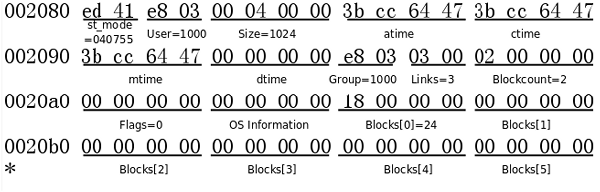
st_mode is displayed in octal. It includes both file type and permissions:
- the high-order
4indicates that the file is a directory; - the lower
755indicates permissions.
Size is 1024, meaning that the root directory currently has one data block.
Links is 3, meaning that the root directory has three references:
.in the root directory;..in the root directory; and..in thelost+foundsubdirectory.
Although / is commonly used to represent the root directory, there is no directory entry literally named /. The slash is a pathname separator and cannot occur in a filename.
Blockcount counts units of 512 bytes, not the file system’s configured block size. The minimum physical I/O unit of traditional disks is called a sector, commonly 512 bytes. Therefore, Blockcount reports physical-sector-sized units, not logical ext2 blocks.
The root directory’s data-block location is indicated by Blocks[0], which contains 24. Thus its data block is block 24.
Its offset in the file-system image is:
1 | 24 × 0x400 = 0x6000 |
At address 006000 in the od output, the root directory data block has the following form.
Figure 29.6. Root Directory Data Block
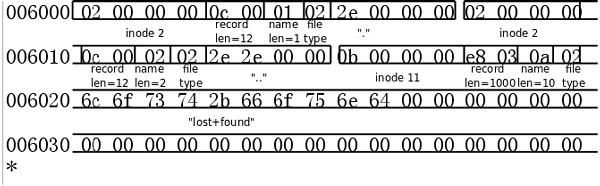
A directory data block consists of variable-length records. Each record describes one entry in the directory.
The first record describes inode 2, the root directory itself:
- record length: 12 bytes;
- filename length: 1 byte;
- file type: 2, meaning directory;
- filename:
..
The file-type code used in directory entries is different from the file-type encoding in st_mode.
| Code | File type |
|---|---|
| 0 | Unknown |
| 1 | Regular file |
| 2 | Directory |
| 3 | Character device |
| 4 | Block device |
| 5 | Named pipe |
| 6 | Socket |
| 7 | Symbolic link |
The second record also describes inode 2, the root directory:
- record length: 12 bytes;
- filename length: 2 bytes;
- file type: 2;
- filename:
...
The third record extends to the end of the block. It describes inode 11, the lost+found directory:
- record length: 1000 bytes;
- file type: 2;
- filename:
lost+found.
The remaining bytes in that record are zeroes.
If a new file is created under the root directory, the third record can be shortened, and a new directory-entry record can be placed in the formerly unused space. If the directory contains too many names for one block, another data block is allocated and its block number is stored in the inode’s Blocks[1] field.
debugfs also provides commands such as cd and ls, allowing the file system to be examined without mounting it. For example, ls in the root directory displays:
1 | 2 (12) . 2 (12) .. 11 (1000) lost+found |
This lists each entry’s inode number, record length, and name. All of that information is read from the root directory’s data block.
Exercises
- Following the analysis of the root directory, analyze the inode and data-block format of the
lost+founddirectory. - Mount this file system, add and delete files, unmount it, and analyze its format again. Compare the changed bytes with the original result.
2.3 Data-Block Addressing
If a file has multiple data blocks, those blocks may not be stored contiguously. How can the file system locate each block?
As shown above, the root directory’s data block is located through the inode’s Blocks[0] index entry. In fact, there are fifteen such entries, i.e. Blocks[0] through Blocks[14]. Each entry occupies four bytes.
The first twelve entries directly contain data-block numbers. For example, Blocks[0] = 24 means that block 24 is a data block of the file.
With a 1 KB block size, the first twelve direct entries can describe file data from offset 0 through 12 KB.
If the remaining entries, Blocks[12] through Blocks[14], were also used as direct block numbers, a file could be no larger than 15 KB. That would be far too small. Instead, the final three entries use indirect addressing.
Blocks[12] does not point to a data block. It points to an indirect block, whose contents are block-number entries similar to Blocks[0].
If the block size is $b$, an indirect block can hold $b / 4$ four-byte block-number entries.
It can therefore point to $b / 4$ data blocks. Using the twelve direct entries plus one single-indirect entry, the maximum number of data blocks is $ 12 + b / 4 $
For 1 KB blocks:
$
12 + 1024 / 4 = 12 + 256 = 268
$
That represents a maximum file size of approximately 268 KB.
Figure 29.7. Data-Block Addressing
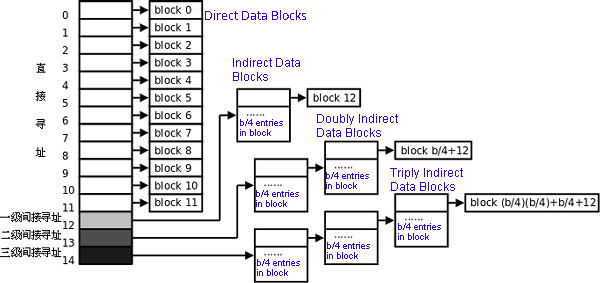
File data blocks are numbered starting at 0:
Blocks[0]points to data block 0;Blocks[11]points to data block 11;- the first entry in the indirect block pointed to by
Blocks[12]points to data block 12; - and so on.
Blocks[13] points to a doubly indirect block, which points to indirect blocks, which in turn point to data blocks. It can represent up to $12 + b / 4 + (b / 4)^2$ data blocks.
With 1 KB blocks, this supports a maximum file size of approximately 64.26 MB.
Blocks[14] points to a triply indirect block, which can represent up to $12 + b / 4 + (b / 4)^2 + (b / 4)^3$
data blocks.
With 1 KB blocks, this supports a maximum file size of approximately 16.06 GB.
This addressing scheme is very fast for files of no more than twelve data blocks. Accessing arbitrary data in such a small file requires, in the simplest uncached case, two disk reads:
- read the inode, which contains the direct block number;
- read the data block.
Accessing a block through triple indirection may require up to five reads:
- inode;
- first-level indirect block;
- second-level indirect block;
- third-level indirect block;
- data block.
In practice, inodes and blocks are often cached by the kernel, so large-file access need not be excessively slow.
2.4 System Functions for File and Directory Operations
This section briefly introduces common system functions used for file and directory operations. Commands such as ls, cp, and mv are also built on these functions.
The emphasis here is on implementation principles rather than detailed usage. Once their underlying behavior is understood, their interfaces can be learned from the relevant manual pages.
stat(2)
The stat(2) function reads a file’s inode and returns its attributes in a struct stat structure.
The stat(1) command is based on the stat system call.
stat must locate an inode by resolving the supplied pathname. Suppose the pathname is:
1 | /opt/file |
The lookup proceeds as follows:
- Read inode 2 from the inode table: the root directory inode.
- Find the root directory’s data-block location from that inode.
- Search the root directory’s data blocks for the entry named
opt. - Read the inode number from the
optdirectory entry. - Read the inode for
opt. - Find
opt’s directory data blocks from its inode. - Search those blocks for the entry named
file. - Read the inode number from the
fileentry. - Read the inode for
file.
There are two related functions:
fstat(2)accepts an already-open file descriptor and returns the associated inode information.lstat(2)accepts a pathname and returns inode information, but differs fromstatfor symbolic links:stat(2)returns information for the symbolic link’s target;lstat(2)returns information for the symbolic link itself.
access(2)
The access(2) function checks whether the user associated with the current process has permission to access a file.
It accepts a pathname and a requested access mode, such as read, write, or execute.
Conceptually, it obtains the file’s st_mode permissions, compares them with the requested access, and returns:
0if access is permitted;-1if an error occurs or access is denied.
chmod(2) and fchmod(2)
chmod(2) and fchmod(2) change a file’s access permissions by modifying the inode’s st_mode field.
Their difference is analogous to that between stat and fstat:
chmodoperates on a pathname;fchmodoperates on an open file descriptor.
The chmod(1) command is based on these functions.
chown(2), fchown(2), and lchown(2)
These functions change a file’s owner and group by modifying the inode’s user and group fields.
Traditionally, only the superuser could reliably perform arbitrary ownership changes.
Their distinctions are analogous to those among stat, fstat, and lstat:
chownfollows symbolic links when operating on a pathname;fchownoperates on an open file descriptor;lchownchanges ownership of the symbolic link itself rather than its target.
The chown(1) command is based on these functions.
utime(2)
The utime(2) function changes a file’s access and modification times by modifying the inode’s atime and mtime fields.
The touch(1) command is based on timestamp-setting operations such as utime.
truncate(2) and ftruncate(2)
truncate(2) and ftruncate(2) change a file’s length.
- If the new length is shorter than the old length, trailing data is removed.
- If the new length is longer, the newly exposed portion reads as zero-filled data.
This may require updating:
Blocksentries in the inode; and- the corresponding bits in the block bitmap.
The distinction between the two functions is analogous to stat versus fstat:
truncateoperates on a pathname;ftruncateoperates on an open file descriptor.
link(2)
The link(2) function creates a hard link.
Its basic principle is to add a new directory entry whose inode number is the same as the original file’s inode number. The inode’s link count is also incremented.
symlink(2)
The symlink(2) function creates a symbolic link.
It creates a new inode whose st_mode file type is symbolic link. The target pathname is stored either:
- directly in the symbolic link inode, if short enough; or
- in allocated data blocks, if longer.
The ln(1) command is based on link and symlink.
unlink(2)
The unlink(2) function removes a directory entry—a link.
For a symbolic link, removing it releases its inode and any data blocks used to store its pathname, clearing the appropriate inode-bitmap and block-bitmap bits.
For a hard link, unlink removes one filename record from a directory data block. If the inode’s hard-link count is greater than one, the underlying file remains because other names still refer to it.
If the link count is one and that final link is removed, the inode and its data blocks can be released, and the relevant bitmap bits are cleared. At that point, the file is actually deleted from the directory hierarchy.
The unlink(1) command and the rm(1) command are based on unlink.
rename(2)
The rename(2) function changes a file’s name by modifying directory-entry records.
If the old and new names belong to different directories, the operation removes a record from the old directory’s data blocks and adds a record to the new directory’s data blocks.
The mv(1) command is based on rename.
Therefore, moving a file between directories in the same file system does not require copying and deleting the file’s inode or data blocks. It usually requires only metadata changes, so it is fast.
Even if an entire directory tree is moved within one file system, only the top-level directory’s placement and relevant metadata need to change; the contents do not need to be copied individually.
However, moving files across file-system boundaries requires copying file data and metadata to the destination and deleting the originals. Moving a directory tree across file systems requires recursively copying and deleting all descendants, so it is much slower.
readlink(2)
The readlink(2) function reads the target pathname stored in a symbolic link.
It obtains the pathname from the symbolic link’s inode or data blocks.
mkdir(2)
The mkdir(2) function creates a directory. It must:
- add a new record to the parent directory’s data block;
- allocate a new inode and data block;
- set the inode’s
st_modefile type to directory; - create
.and..entries in the new directory’s data block; and - increment the parent directory’s hard-link count, since the new directory’s
..points to its parent.
The mkdir(1) command is based on mkdir.
rmdir(2)
The rmdir(2) function removes a directory.
The directory must be empty apart from . and ... Removal involves:
- releasing the directory’s inode and data block;
- clearing the related inode-bitmap and block-bitmap bits;
- removing the directory’s entry from the parent directory’s data block; and
- decrementing the parent directory’s hard-link count.
The rmdir(1) command is based on rmdir.
opendir(3), readdir(3), and closedir(3)
These library functions are used to traverse directory entries.
opendiropens a directory and returns aDIR *pointer, a handle similar to aFILE *.readdirreads one directory entry at a time and returns a pointer tostruct dirent.closedircloses the directory handle.- When all entries have been read,
readdirreturnsNULL.
The struct dirent definition is:
1 | struct dirent { |
These fields largely correspond to the directory-entry format shown in “Figure 29.6. Root Directory Data Block.”
The d_name field has been processed by the library and is terminated by '\0'. In contrast, a filename stored directly in an ext2 directory entry is not necessarily null-terminated; its end must be determined from the preceding filename-length field.
The following example, adapted from The C Programming Language by Kernighan and Ritchie, recursively prints files and directories below a given directory, similarly to ls -R.
Example 29.1. Recursively listing files in a directory
1 |
|
However, this program is not as robust as ls -R; it may enter an infinite loop. Consider what situation could cause that to happen.